Question:
How to check individual or organization base DSC?
Solution:
Step 1) Insert USB token into the system.
Step 2) Open Microsoft Edge browser.
Step 3)

Step 4)

Step 5) Click on Internet options.
(Alternatively, you can search for "Internet Options" directly in your Windows Search bar).


Step 6) click the Content tab >> Click on the Certificates button


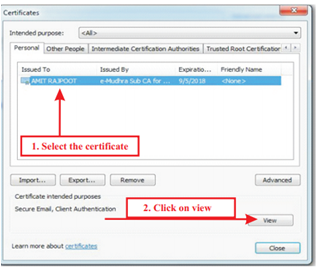
Step 7) Select the Certificate and click on View

Step 8) Click on Issuer Statement Below.

Step 9) Check Whether Your DSC is Individual or Organization Based.
INDIVIDUAL BASED DSC ORGANIZATION BASED DSC


>> Further, user can check the name of organization.
Click on Details>> Click on Subject>> Check the name of organization

Watch the solution in video